
Do you use Microsoft Teams?
Are you confident in using Microsoft Teams to stay in touch with your coworkers?
But, are you really making the most out of your Teams experience? This single app is in fact a workplace productivity hub that can help you achieve everyday tasks in less time.
Looking to boost your collaboration experience with some Microsoft Teams integration? Well, you’ve come to the right place.
We will be sharing several tips so stay tuned. Today’s tip:
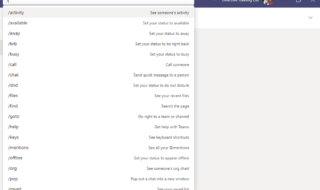
Use the command line to save time!
Did you know that the search bar in Teams doubles as a command line?
Commands are shortcuts for performing common tasks in Teams: update your status, go to a specific channel, show your recent files and saved messages, and more.
Type in one of the recognised commands to take a shortcut to some of the most frequent tasks: /files to view your recent files, /unread to see new activity, and /call to make a call, just to name a few.
Want to learn more about Microsoft Teams:
melisa@directivetraining.co.uk
01482 534336 / 07980 259686